
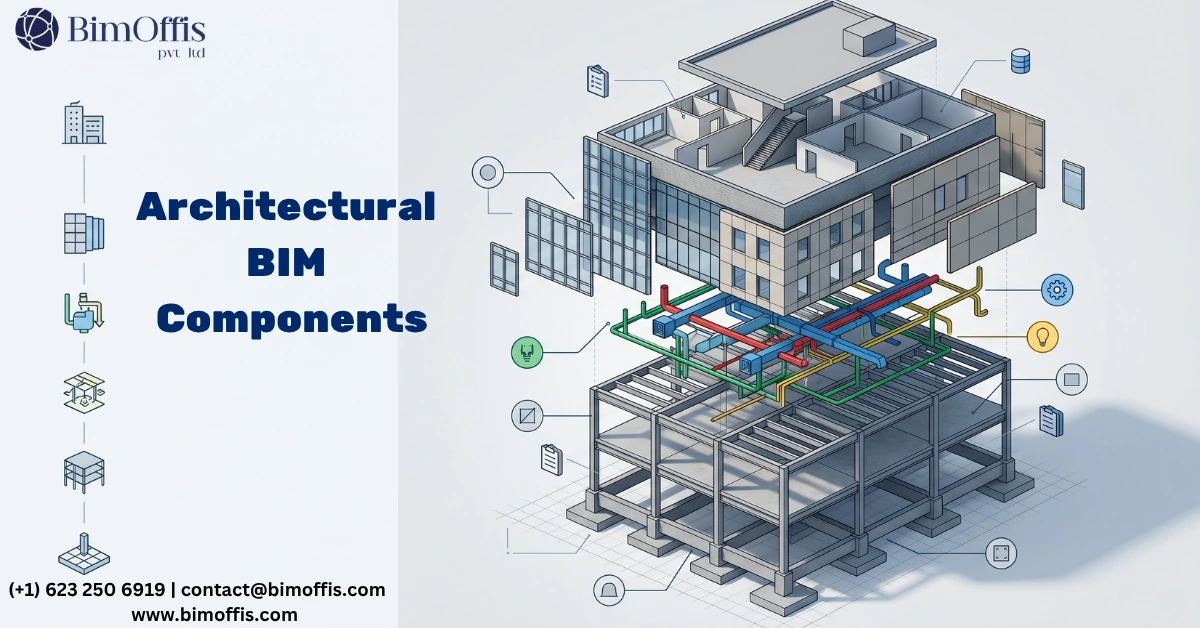
What an Architectural BIM Model Actually Is
When people talk about an architectural BIM model, they usually describe it as a 3D version of the building. Walls, floors, roofs, doors, and windows make up the visible structure. That explanation is partially correct, but it misses the real value of BIM.
A properly developed architectural BIM model is a coordinated and data-rich environment where geometry, information, and documentation all work together. Every design decision connects to the model. Drawings are generated from it. Schedules, quantities, and coordination checks also depend on it.
The building itself exists inside the model, but so does the information that makes the building useful for designers, contractors, consultants, and facility managers.
This is what separates a simple 3D model from a true BIM workflow.
Project Setup
Levels, Grids, and Shared Coordinates
Project setup begins with levels, grids, and shared coordinates. Most teams want to finish this stage quickly so modeling can start immediately. Unfortunately, rushing through setup often creates coordination issues later in the project.
Levels define the vertical organization of the building. Floors, ceilings, roofs, and other elements rely on accurate level placement. Small errors in level heights can affect every floor above them and become difficult to correct later.
Grids provide the reference framework used by architectural, structural, and MEP teams. Consistent grid naming and positioning make coordination easier between all disciplines. Poorly managed grids usually create confusion during model linking and clash detection.
Shared coordinates ensure that all discipline models align correctly in the same location. Proper coordinate setup is essential for BIM coordination. Incorrect shared coordinates normally become visible only when consultants begin combining models and discover that nothing aligns correctly.
Why Early Setup Matters
Many coordination problems do not come from complicated design issues. Most problems actually start with inaccurate setup decisions made during the first stages of the project.
Teams that invest time in organizing levels, grids, and coordinates properly usually experience smoother coordination throughout the project lifecycle.
Model Elements
The Physical Building in Digital Form
Walls, floors, roofs, ceilings, stairs, doors, and windows represent the physical building inside the BIM environment. These elements consume most of the modeling time during architectural production.
Wall construction requires careful attention because layer structures affect dimensions, sections, and coordination accuracy. Core materials, insulation, finishes, and air gaps all need correct thicknesses and sequencing. Simplified wall assemblies often create inaccurate drawings and coordination conflicts.
Floors and roofs follow the same principle. Their build-up should reflect actual construction conditions and match the structural engineer’s information. Differences between architectural and structural slab thicknesses can create avoidable coordination issues across multiple disciplines.
Doors, Windows, and Stairs
Doors and windows depend heavily on family quality. Poorly built families can generate incorrect schedules, inaccurate elevations, and unreliable geometry.
Good family content allows schedules to update automatically without manual checking. Accurate parameters also improve tagging, filtering, and documentation consistency across the project.
Stairs are often one of the most difficult architectural elements to model. They interact with multiple levels and structural components while needing to display correctly in plans, sections, and 3D views.
A properly built stair works reliably throughout the project. Poor stair modeling usually creates repeated documentation issues in multiple drawings.
Family Content
The Intelligence Behind the Model
Family content plays a major role in determining whether a BIM model functions effectively on a real project.
System families such as walls and floors exist directly inside Revit. Loadable families include doors, windows, furniture, and specialist components created separately and inserted into the model.
Well-built families contain accurate parameters, correct category assignments, and realistic geometry. Visibility settings also need to match different drawing scales without unnecessarily increasing model size.
Bad family content creates hidden problems that usually appear during documentation or coordination stages. The model may look visually complete, but schedules can contain missing information, geometry may not match actual products, or families may fail when dimensions change.
These issues reduce confidence in the model and slow down production work significantly.
Views and Documentation
Turning the Model Into Deliverables
The purpose of BIM modeling is not simply creating 3D geometry. The real goal is producing reliable documentation and coordinated project information.
Floor plans, sections, elevations, reflected ceiling plans, and site plans all present the model differently depending on the audience and project stage.
Consistent view templates help maintain visual quality throughout the drawing set. Elements should display at the correct level of detail while annotations remain readable and coordinated.
Detail Views and Schedules
Detail views communicate construction-level conditions such as wall junctions, thresholds, facade interfaces, and stair details. These drawings usually combine model geometry with 2D drafting components for greater clarity.
Schedules reveal the true quality of a BIM model. Door schedules, room schedules, window schedules, finish schedules, and quantity takeoffs all rely on accurate data.
When models are built correctly, schedules update automatically as the design changes. Poor modeling practices force teams into manual checking processes that waste time and introduce inconsistencies.
Room Data
The Most Overlooked Part of BIM
Rooms inside a BIM model are more than simple labels placed on floor plans. They are intelligent data objects capable of storing information such as area, occupancy, finishes, acoustic requirements, and space usage.
Accurate room data allows teams to generate room data sheets, finish schedules, and compliance reports directly from the model.
This process helps verify whether the design meets project requirements without manually comparing drawings and spreadsheets.
Many projects treat room data as an afterthought. Room tags often get added late in the design phase without properly checking boundaries or information fields.
As a result, the model may appear complete visually while lacking the data needed for fit-out coordination, MEP planning, and facilities management.
Coordination Setup
Making the Model Work With Other Disciplines
Architectural BIM models must coordinate with structural and MEP models throughout the project lifecycle.
The architectural model also connects with Navisworks for clash detection and often exports to IFC for consultants using different software platforms.
Smooth coordination depends heavily on early setup decisions. Correct shared coordinates, consistent level naming, organized worksets, and proper file management all improve multidisciplinary collaboration.
Why Coordination Quality Matters
Well-organized coordination workflows reduce design conflicts and improve communication between project teams.
Poor coordination setup creates repeated issues during linking, clash detection, and design revisions. These problems increase project delays and reduce confidence in the BIM process.
Projects that prioritize coordination standards from the beginning usually experience better productivity and fewer technical problems later.
The Simple Version
An effective architectural BIM model depends on six major components working together correctly:
- Project setup
- Model elements
- Family content
- Views and documentation
- Room data
- Coordination setup
Each component affects the others. Weakness in one area eventually creates problems throughout the entire project.
Teams that manage these components properly achieve better documentation quality, smoother coordination, and more reliable project information throughout design, construction, and facility management.
Ready to find out what your project will cost? Find out here.
Frequently Asked Questions from Clients
What is an architectural BIM model exactly?
More than a 3D building. It is a coordinated, data-rich environment where geometry, information, and documentation all work together and depend on each other.
Why does project setup matter so much?
Levels, grids, and shared coordinates form the foundation everything else builds on. Wrong setup at the start compounds through every floor and every discipline.
Why do families have such a big impact on model quality?
Families drive schedules, documentation, and coordination behavior. Poorly built families produce wrong data, incorrect drawings, and coordination geometry that does not match reality.
How do views and schedules connect to the model?
They pull directly from model geometry and family data. When the model is built correctly, documentation updates automatically every time the design changes.
Why do most models handle room data poorly?
Teams treat rooms as floor plan labels rather than data objects. Correctly set up rooms generate area schedules and room data sheets automatically without manual input.
What does coordination setup actually involve?
Shared coordinates, consistent level and grid naming, and workset organization. Getting these right from the start makes every discipline interaction run smoothly throughout the project.







