
When I first got into BIM properly, I genuinely thought Revit and Navisworks were basically the same software. I assumed one was simply a newer version of the other because both names constantly appeared in the same conversations. At the time, it felt like the difference barely mattered.
However, working on a real coordinated project completely changed that understanding. Once I realized they serve entirely different purposes, the entire Revit and Navisworks workflow finally started making sense. This is the honest explanation of how both platforms work together on actual construction projects with real multidisciplinary teams.
Revit Is Where the Building Gets Designed
Every discipline on a BIM project works primarily inside Revit.
Architects create walls, floors, roofs, stairs, and openings. Structural engineers develop the frame, including columns, beams, slabs, cores, and foundations. At the same time, MEP consultants route ductwork, run pipework, place equipment, and organize cable trays.
Each discipline maintains its own Revit file with dedicated families, parameters, and project data. Those individual models become the foundation for everything else that follows throughout the BIM process.
In fact, every drawing, schedule, quantity takeoff, and documentation package begins inside somebody’s Revit model.
The Limitation Most Teams Eventually Discover
Although Revit performs extremely well within a single discipline model, coordination becomes much harder once several large linked files enter the picture.
Basic model linking works reasonably well. Still, bringing together architecture, structure, mechanical, electrical, and plumbing models into one environment for heavy coordination is not really what Revit was built for.
Eventually, performance slows down, clash reviews become inefficient, and the coordination process turns difficult to manage. In many ways, trying to use Revit alone for full project coordination is similar to managing company finances inside a text document. Technically possible, but far from ideal.
That gap is exactly where Navisworks becomes essential.
Navisworks Is Where Coordination Happens
The most important thing to understand about Navisworks is surprisingly simple.
Navisworks does not create the building model.
It does not model walls, beams, slabs, pipes, or ductwork. Instead, the software combines models created in other platforms and brings them into one federated environment. From there, the entire project team can review how every discipline interacts before construction begins on site.
As a result, coordination issues become visible long before they become expensive construction problems.
How the Export Cycle Actually Works
On a real BIM project, the workflow usually follows a repeating coordination cycle.
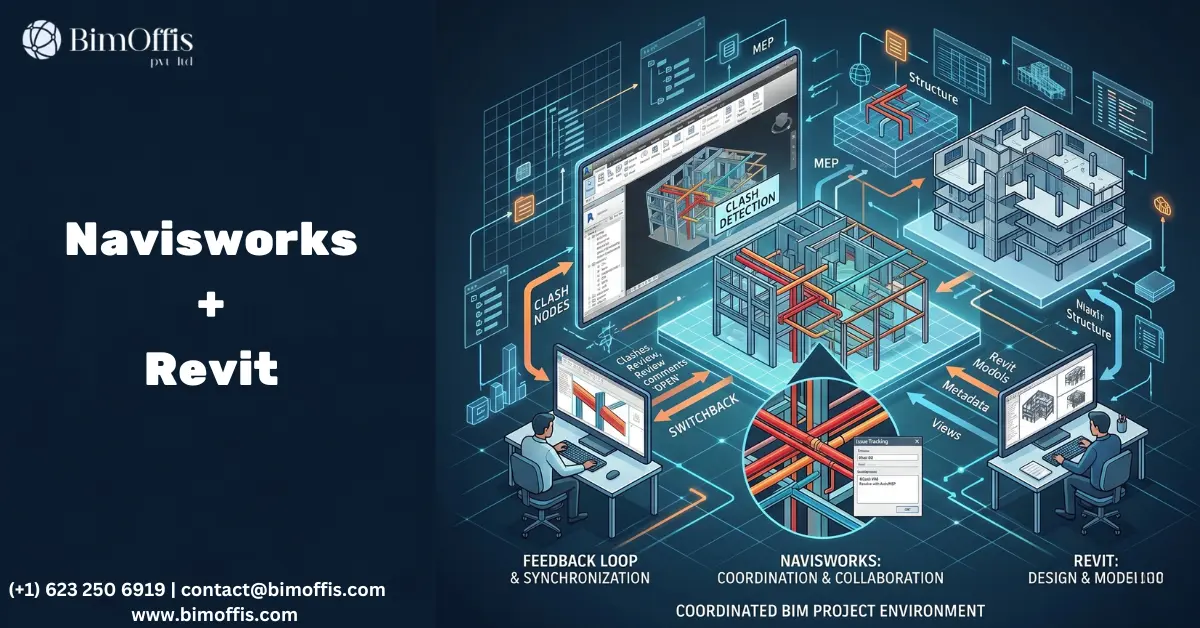
Each discipline team continuously develops and updates its Revit model throughout the design phase. Then, every week or two, teams export their latest model into an NWC file format. Those NWC files are combined inside Navisworks to create a federated coordination model.
Once the federated model is assembled, clash detection begins.
The coordination team reviews the clash results, identifies critical conflicts, and discusses solutions with the wider project team. After decisions are made, each discipline returns to its Revit model, updates the design, and exports a fresh NWC file for the next coordination round.
That continuous loop, Revit to Navisworks, decisions back into Revit, and updated exports returning to Navisworks, becomes the heartbeat of a properly managed BIM workflow.
On well-run projects, this process continues throughout design development and often extends well into construction.
What Clash Detection Really Feels Like
The polished version of clash detection rarely prepares people for the reality of the first coordination review.
The First Clash Report Usually Looks Terrifying
On a large project, the first clash report can easily contain hundreds of issues. Seeing five hundred clashes for the first time often feels like a disaster.
In reality, though, that result usually means the coordination process is doing its job correctly.
Finding problems inside a model is infinitely better than discovering them on-site after materials arrive, trades mobilize, and cranes are already booked.
Navisworks simply identifies where elements from different disciplines occupy the same physical space. The software detects the conflict, but people still decide whether the clash actually matters.
How Coordination Meetings Work
Some clashes are genuinely critical. For example, a structural beam passing directly through a major duct route must be resolved before construction starts.
Meanwhile, other clashes are simply modeling noise. Tiny overlaps caused by tolerances or simplified geometry may have little real-world impact.
Over time, experienced BIM teams quickly learn to distinguish between serious coordination issues and unnecessary clutter. Fortunately, Navisworks includes filtering and grouping tools that help teams prioritize the most important clashes first.
After filtering comes the coordination meeting itself.
Typically, architects, structural engineers, MEP consultants, and the contractor sit together to review conflicts one by one. The team decides who moves what, which discipline redesigns certain elements, and how the issue should be resolved.
Following the meeting, every discipline updates its Revit model, exports fresh NWC files, and starts the next coordination cycle.
Eventually, the model becomes coordinated enough that the construction team can trust what they see.
The Features Many Teams Barely Use
Interestingly, many companies only use Navisworks for clash detection. As a result, several genuinely valuable capabilities often get ignored.
4D Simulation
One of the most impressive features inside Navisworks is 4D simulation.
By linking the federated model to the construction programme, teams can visually simulate the entire construction sequence over time. Problems that remain hidden inside a traditional Gantt chart suddenly become obvious once the build sequence is animated visually.
For phased projects or highly complex structures, this becomes far more than a presentation tool. In many cases, it directly improves construction planning and logistics.
Navisworks Freedom
Another underrated tool is Navisworks Freedom, the free viewer version of the software.
Using Freedom, contractors, subcontractors, clients, and site supervisors can open and navigate the federated model without requiring a full Revit license. They can inspect spaces, review clearances, measure components, and better understand coordination decisions from a site perspective.
Once site teams actively use the model during construction, the gap between the digital model and the actual built work usually becomes much smaller.
That gap is where many construction problems quietly begin.
Where BIM Coordination Usually Fails
Interestingly, the biggest coordination failures are rarely caused by software itself.
Instead, most workflow problems come from poor process management.
Inconsistent Model Exports
The federated model is only as accurate as the latest exports from each discipline.
When one consultant falls weeks behind on updates, the coordination model immediately becomes unreliable. New clashes remain hidden because outdated geometry is still being reviewed.
For that reason, every project needs a strict export schedule with clearly assigned responsibility.
Treating Coordination as a One-Time Exercise
Some teams run clash detection once near the end of design and assume coordination is complete.
In reality, BIM coordination is an ongoing process. Design changes constantly, disciplines react to each other continuously, and new clashes appear throughout the project lifecycle.
Therefore, successful coordination requires regular review cycles from early design through construction documentation.
Skipping Coordination Meetings
A clash report sitting unread in somebody’s inbox is not coordination.
Real coordination only happens when the right people sit together, review issues collaboratively, make decisions, and assign responsibility for solutions.
Without that conversation, clash reports are simply unresolved problems waiting to appear on-site later.
The Simple Version
Revit is where the building gets designed, modeled, and documented.
Navisworks is where all disciplines come together so coordination can happen before construction begins.
When both tools are used properly, with regular exports, structured coordination meetings, consistent review cycles, and disciplined follow-through, projects run far more smoothly. Construction teams receive better information, site clashes reduce dramatically, and documentation reflects what is actually being built.
Ultimately, that combination of process discipline and coordinated teamwork is what proper BIM is really supposed to deliver.
Ready to find out what your project will cost? Find out here.
Frequently Asked Questions from Clients
What is the main difference between Revit and Navisworks?
Revit is used for creating and documenting building models, while Navisworks is used for coordination and clash detection between multiple discipline models.
Does Navisworks allow you to create models?
No. Navisworks does not create or edit building elements. It only combines and reviews models exported from software like Revit.
Why is clash detection important in BIM projects?
Clash detection helps teams identify design conflicts before construction begins, reducing costly site issues, delays, and rework.
How often should models be exported to Navisworks?
Most projects update and export NWC files weekly or bi-weekly to keep the federated coordination model current and reliable.
What is a federated model in Navisworks?
A federated model combines architectural, structural, and MEP models into one coordinated environment for review and coordination.
What is Navisworks Freedom used for?
Navisworks Freedom is a free viewer that lets contractors, clients, and site teams open and review coordinated models without a Revit license.







