
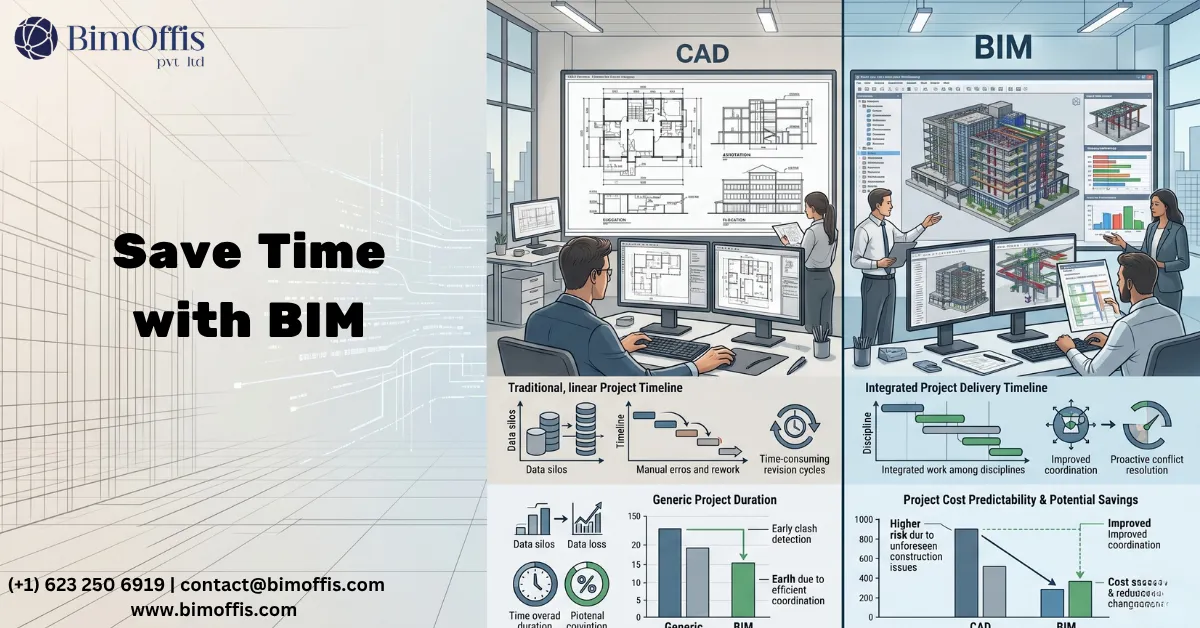
CAD vs BIM workflow is a question that comes up in architecture and engineering firms constantly, and the honest answer is more nuanced than most comparisons suggest.
Let me start with something worth saying plainly. This is not a competition where one side wins unconditionally. CAD has served the construction industry well for decades. Similarly, BIM has transformed how complex projects get delivered. The question of which saves more time and cost, however, depends on what kind of project you are working on, what workflows you are running, and what you are comparing against.
That said, for any project of meaningful complexity, the evidence is consistently clear. BIM workflows save more time and cost than CAD workflows over the full project lifecycle. Understanding why that is true, therefore, requires understanding where time and cost actually get consumed on construction projects.
What Each Workflow Actually Is
The CAD Workflow
In a CAD workflow, the design team produces a collection of separate drawings. Floor plans, sections, elevations, and details all exist as individual files that someone draws and maintains independently.
Design changes, for instance, mean someone updates the affected drawings manually. Likewise, disciplines coordinate by exchanging drawing sets and comparing them. Quantities, meanwhile, require manual measurement from the drawings, and clashes surface as marked-up drawings sent back to the relevant discipline.
The CAD workflow is fundamentally a manual coordination system. It works, and it has worked on billions of square metres of construction worldwide. Furthermore, it works reasonably well when projects are simple, when the design is stable, and when coordination between disciplines is straightforward.
The BIM Workflow
In a BIM workflow, by contrast, the design team builds an intelligent three-dimensional model. Every element carries data, and every view derives from the same source. As a result, design changes trigger automatic documentation updates, disciplines coordinate from the same federated model, and quantity generation happens automatically. In addition, automated clash detection finds conflicts before anyone starts building.
The BIM workflow is a coordinated information system. Admittedly, it requires more upfront investment in model setup and team capability. However, it returns that investment through every stage of the project that follows.
Where CAD vs BIM Workflow Matters Most
Time Spent on Documentation
This is where the CAD vs BIM workflow difference shows up most clearly in day-to-day practice.
In a CAD workflow, documentation is a manual exercise. Every drawing sheet gets produced individually, so a design change means every affected drawing needs updating manually. On a large project with hundreds of drawing sheets and a design that evolves continuously through development, therefore, keeping the documentation current is a constant and time-consuming battle.
In a BIM workflow, on the other hand, documentation comes directly from the model. Change the design, and every affected drawing updates automatically: the floor plan reflects the current design, the section reflects the current design, and the door schedule reflects the current design too. All of this happens without anyone manually reconciling separate drawing files.
For a firm working on a large commercial project, the documentation time saving from a BIM workflow compared to a CAD workflow is significant. As a result, the design team spends less time on production and more time on design. Consequently, the quality of design decisions improves alongside the efficiency of documentation production.
Coordination Between Disciplines
In the CAD vs BIM workflow debate, coordination is where the cost difference becomes most financially significant.
In a CAD workflow, coordination happens through drawing exchange and manual checking. Disciplines produce their drawings separately and then compare them. Obvious conflicts get caught this way, but subtle three-dimensional conflicts that only become apparent when all systems exist in the same spatial environment simultaneously often get missed.
These missed conflicts, unfortunately, show up on site. For example, a structural beam might sit exactly where the main ductwork run needs to go. Similarly, an MEP service might route through a structural element that nobody flagged during coordination, or an electrical cable tray might occupy the same space as the plumbing pipework. Fixing these conflicts during construction, as a result, costs significantly more than fixing them during design.
In a BIM workflow, however, all discipline models sit in the same coordinated environment. Automated clash detection finds every geometric conflict between systems during design rather than during construction. Specifically, the cost of resolving a coordination conflict in a model is a few hours of a modeler’s time. In contrast, the cost of resolving the same conflict on site involves rework, programme delay, trade contractor standby, and the knock-on effects that ripple through installation sequences.
Research across the construction industry consistently shows that the cost of fixing a problem grows dramatically the later it gets discovered in the project lifecycle. Consequently, BIM workflows move problem discovery to the earliest and cheapest point.
Quantity Takeoffs and Cost Planning
Manual quantity takeoffs from CAD drawings are time-consuming and prone to error. Someone measures and counts elements from drawing files, and design changes mean the quantities need updating separately. Over time, cost plans drift away from the current design as updates accumulate.
In a BIM workflow, by comparison, quantities come directly from the model. Wall areas, door counts, structural quantities, and MEP material quantities all generate automatically from the modeled elements, and design changes trigger automatic quantity updates along with them.
For cost managers and quantity surveyors, therefore, the accuracy improvement from model-generated quantities compared to manually measured CAD quantities has direct financial value. More accurate quantities mean more accurate cost plans, and more accurate cost plans mean fewer budget surprises during construction and procurement.
The Honest Cost Comparison
Upfront Costs: CAD Wins
Let me be direct about this. In a straight upfront cost comparison, CAD wins. Starting a project in CAD, after all, requires less initial investment than starting in BIM.
Specifically, BIM software costs more than CAD software, and teams need more training to reach genuine BIM proficiency than basic CAD competency. Model setup also takes more time than starting a new drawing file. For a simple project with stable design and straightforward discipline coordination, consequently, the upfront investment in BIM may not pay back within the project.
This is a real consideration for smaller firms and simpler project types. Not every project benefits equally from a BIM workflow, and pretending otherwise does not serve anyone well.
Lifecycle Costs: BIM Wins
However, the picture changes completely when you look at the full project lifecycle rather than just the design phase.
On any project with meaningful coordination complexity, the cost of construction-stage clashes discovered in a CAD workflow consistently exceeds the additional upfront investment in a BIM workflow. Furthermore, the documentation efficiency of BIM reduces design team time on production work throughout design development, and the quantity accuracy of BIM reduces procurement surprises during the construction phase.
Additionally, for building owners and facilities managers, the as-built BIM model that a project delivers at handover has operational value that no CAD drawing set can match. In particular, an accurate, data-rich BIM model supports maintenance planning, space management, future renovation design, and compliance management in ways that reduce operational costs over the building’s lifetime.
The Crossover Point
The crossover point where BIM saves more time and cost than CAD occurs at different project scales and complexity levels. For most commercial projects above a certain threshold of discipline coordination complexity, that crossover typically happens well within the construction phase. Indeed, the coordination savings alone usually justify the BIM investment on any project with meaningful MEP and structural coordination requirements.
Where CAD vs BIM Workflow Still Favours CAD
It is worth being honest about the project types where CAD workflows remain a practical and cost-effective choice.
Simple, single-discipline projects with stable design and no coordination requirements between structural, MEP, and architectural disciplines, for example, do not generate enough coordination complexity to justify the BIM investment. Small residential projects, simple fit-out works, and projects where the design is well established before documentation begins may all run more efficiently in CAD, therefore.
Furthermore, for firms working predominantly in these project types, the investment in genuine BIM capability may not pay back against their specific project pipeline. In short, CAD is not a failing technology. Rather, it is the wrong tool for complex coordinated projects and the right tool for simple ones.
The Bottom Line
CAD vs BIM workflow is not a question with one answer that applies to every project and every firm. However, for any project with meaningful coordination complexity between multiple disciplines, meaningful MEP infrastructure, and a design that evolves throughout development, BIM workflows save more time and cost than CAD workflows over the full project lifecycle.
The upfront investment is real, and so is the return. Indeed, on complex projects where coordination failures and rework have historically consumed significant portions of construction budgets, the return on BIM workflow investment consistently justifies the investment many times over.
Ready to move beyond CAD? Get a free quote for BIM workflow solutions tailored to your project.
Frequently Asked Questions from Clients
What is the difference between CAD and BIM?
CAD creates 2D/3D drawings, while BIM creates intelligent models with project data.
Which saves more time: CAD or BIM?
BIM typically saves more time through automation, coordination, and reduced rework.
Does BIM reduce construction costs?
Yes, BIM improves planning, clash detection, and quantity estimation to reduce costs.
Is BIM better than CAD for collaboration?
Yes, BIM enables real-time collaboration among architects, engineers, and contractors.
Can CAD drawings be converted to BIM?
Yes, existing CAD files can be converted into intelligent BIM models.
Which industries benefit most from BIM workflows?
Architecture, engineering, construction, infrastructure, and facility management.







