
Let me be straight with you, when I first heard the term “3D BIM modeling services,” I thought it was just fancy marketing language for making 3D drawings. Turns out I was wrong, and most people in the industry still carry that same misconception.
So let’s talk about what this actually is, why it matters on real projects, and what AEC teams should know before hiring anyone for it.
The Simple Answer Nobody Gives You
3D BIM modeling services are not just about making a building look nice in 3D.
Yes, you get a three-dimensional model. But the real point is the data sitting behind every single element in that model. A wall isn’t just a wall; it carries its thickness, fire rating, material cost, installation sequence, and contractor responsibility all in one place.
That’s the difference. CAD gives you geometry. BIM gives you geometry plus information. On a construction project with dozens of consultants and subcontractors working at the same time, that information stops things from going sideways.
Why This Actually Matters on Site
Here’s a real scenario worth walking through. Two teams, one structural, one MEP, work on their drawings separately. The structural engineer places a beam at a certain height. An MEP engineer routes a main duct through that exact same space. Nobody catches it because both teams stare at 2D drawings on separate sheets.
Fast forward to site. Workers already installed the duct. Steel is going up. Now someone has to make a call, cut the duct, shift the beam, or drop the ceiling height. Every option costs money and delays the programme.
This is not a rare situation. Projects without coordinated BIM models run into this constantly.
3D BIM modeling services exist precisely to catch this kind of conflict at the design stage, where fixing it costs almost nothing.
What Teams Actually Gain From It
- Clash detection happens digitally before anyone builds a single thing. MEP vs structure, MEP vs architecture, structure vs architecture, the software catches all of it before boots hit the ground.
- Every person on the project looks at the same model. Not different drawing versions, not last week’s PDF, the same live model, always current.
- Design changes reach every discipline immediately. When the architect shifts something, structural and MEP teams see the impact right away, no more chasing updated sets over email.
- Quantity takeoffs come directly from the model data. Your QS stops scaling off drawings and hoping the numbers hold up.
- Subcontractors plan their work sequence properly because they can actually visualize the building before arriving on site.
What These Services Actually Include
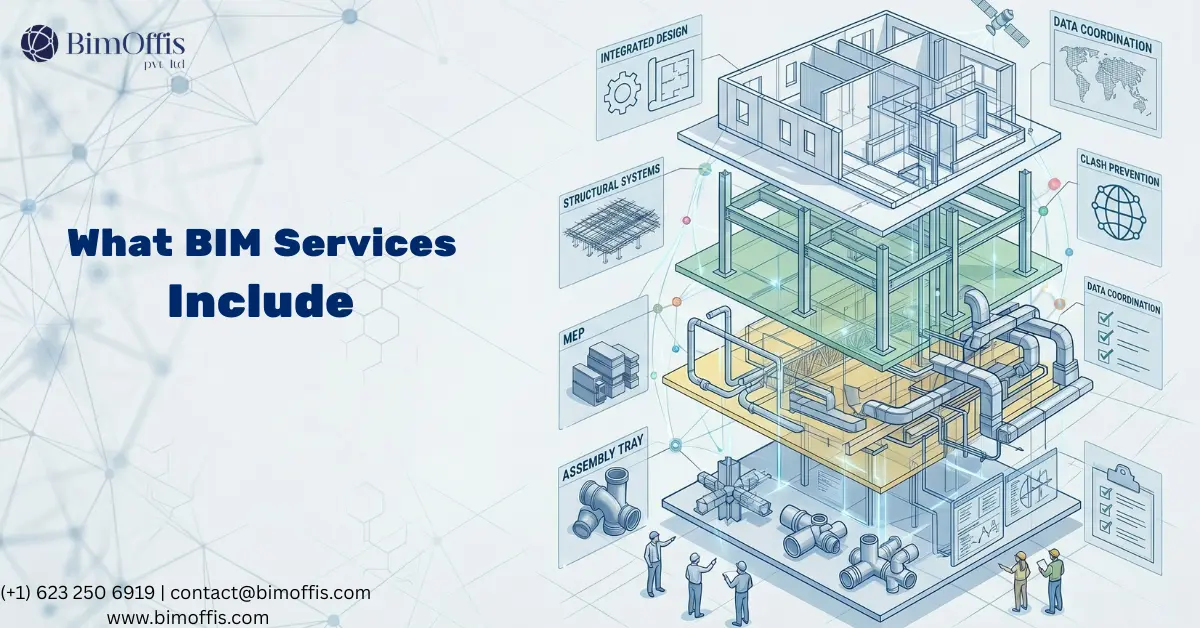
Here’s where it gets practical. When a firm says they offer 3D BIM modeling services, this is what they might actually deliver.
Architectural BIM Modeling
The building envelope and internal layout, walls, floors, ceilings, doors, windows, stairs, finishes. Architectural modeling is usually where every project begins, and other disciplines build their coordination around it.
Structural BIM Modeling
Columns, beams, slabs, foundations, connections, structural BIM teams model all of it. Engineers use these models for analysis, coordination with architecture, and generating fabrication-level shop drawings. On steel projects especially, a detailed structural BIM model feeds directly into the fabrication process.
MEP BIM Modeling
Mechanical, electrical, plumbing, all three combined into one coordinated model. MEP coordination is the hardest part of any BIM project because so many systems compete for the same ceiling void space. A solid MEP BIM model routes everything with real dimensions, actual clearances, and access requirements fully accounted for.
Clash Detection and Coordination
Some firms offer this as a standalone service. A BIM coordinator takes your architectural, structural, and MEP models, combines them into a federated model, and runs clash detection. That process produces a clash report, every conflict with screenshots and exact locations, and the design team works through each issue before construction starts.
As-Built Modeling
Once construction wraps up, someone needs to document what actually got built, not the design intent, but the real conditions. Pipes took different routes around obstacles. Walls shifted during construction. Equipment landed in a different spot. An as-built BIM model records all of this and hands building owners something genuinely useful for operations and future renovations.
What LOD Means and Why It Keeps Coming Up
LOD stands for Level of Development. It describes how detailed and reliable the information inside a BIM model is at any given project stage.
At LOD 100, the model shows rough massing with approximate sizes and no real detail. Moving up to LOD 300 brings coordinated design-level geometry that teams can use for full coordination. LOD 400 reaches fabrication-ready detail, while LOD 500 reflects verified as-built conditions after construction.
Getting this wrong at the start creates problems later. Paying for LOD 400 at concept stage wastes budget on detail nobody needs yet. Handing a contractor a LOD 200 model for ductwork fabrication means they guess on dimensions, and that guessing shows up as costly errors on site.
Sort out LOD requirements for each phase before your BIM partner touches the model. That single conversation saves a lot of arguments down the road.
How to Tell a Good BIM Partner From a Bad One
Here’s the honest version, plenty of firms claim they do BIM, but drawing in Revit and delivering proper BIM coordination are two completely different things.
A firm that genuinely delivers 3D BIM modeling services brings a BIM Execution Plan to the table before starting work. Strong partners show you actual clash reports from past projects, not just polished renders. Right from day one, they ask about your common data environment, naming conventions, and deliverable formats.
Someone who jumps straight from portfolio to pricing without asking those questions, push back hard. Renders look impressive, but a coordination report tells you whether the team actually understands the work.
One Last Thing
BIM isn’t reserved for large firms or mega-projects. Smaller practices and regional contractors now use it on mid-sized jobs because one round of rework always costs more than a full BIM coordination service.
Starting out doesn’t need to feel complicated. Pick one project, lock in your LOD requirements early, and choose a BIM partner who shows you their process rather than just their outputs. Run it through once and see what shifts.
Most teams that go through it properly never want to return to the old way of working.
Ready to find out what your project will cost? Find out here.
Frequently Asked Questions from Clients
What are 3D BIM modeling services?
Creating intelligent, data-rich digital building models that carry real project information beyond just 3D geometry.
Who needs 3D BIM modeling services?
Architects, structural engineers, MEP consultants, contractors, and building owners across all project sizes.
What is the difference between BIM and CAD?
CAD shows geometry. BIM shows geometry plus real data, materials, costs, installation sequence, and more.
What does LOD mean in BIM?
Level of Development, a scale from LOD 100 (basic massing) to LOD 500 (verified as-built conditions).
How does BIM reduce construction costs?
It catches clashes digitally before construction. Fixing issues on screen costs far less than fixing them on site.
What software do BIM modeling teams use?
Revit for modeling, Navisworks for clash detection, and ArchiCAD or Tekla on some project types.







